SneakerTracker: Computer Vision Wear Logging for My Shoe Collection
I built a system that watches my shoe shelf with a Raspberry Pi camera, detects when shoes are removed, and automatically logs wear sessions to a database — complete with a React dashboard, stats, and Azure Blob Storage for photos.
I have a lot of sneakers. A wall of them, floor to ceiling, stored in clear drop-front boxes. I'd been meaning to track my wears for a while — which ones I actually reach for, which ones are basically display pieces — but manually logging it never stuck.
So I built something that does it for me.
SneakerTracker is a Raspberry Pi 5 with a wide-angle USB camera pointed at my shoe shelf. It watches the shelf continuously, detects when shoes are removed from their zones, and automatically logs the wear to a PostgreSQL database. When the shoe comes back, it closes the wear session and records the duration. There's a React dashboard for managing the collection, drawing detection zones, viewing stats, and browsing wear history.
This post covers how it works, the problems I ran into, and the decisions that shaped the final system.
The Hardware Setup
The Pi sits on a shelf across the room with a wide-angle USB webcam. I originally planned to use an Arducam IMX519 ribbon camera, but the ribbon cable arrived broken, so I pivoted to USB. It works fine — 1920×1080, good low-light performance.
The shoe wall has 28 display slots. Each slot is a clear Sneaker Display drop-front box stacked in a 4×7 grid. The camera captures the entire wall in a single frame.
Architecture
[USB webcam on Pi 5]
        ↓
[Python + OpenCV — zone detection, motion guard, optical flow]
        ↓ HTTP
[FastAPI on Windows PC — REST API, business logic]
        ↓
[PostgreSQL in Docker — shoes, zones, wears, detections]
        ↑
[React dashboard — collection, zones, stats, wear history]
The Pi runs a Flask server that serves an MJPEG stream and handles detection. The FastAPI backend runs on my main PC alongside Docker. The React dashboard talks to FastAPI directly.
Zone Detection
The core detection logic is background subtraction per zone. When the system starts, it captures a baseline frame for each zone — what the slot looks like with a shoe in it. On each detection cycle, it compares the current frame crop against the baseline using mean absolute difference.
diff = cv2.absdiff(current_crop, baseline_crop)
gray_diff = cv2.cvtColor(diff, cv2.COLOR_BGR2GRAY)
confidence = gray_diff.mean() / 255.0

if confidence > CONFIDENCE_THRESHOLD:
    state = 'absent'
else:
    state = 'present'
A confidence above the threshold means the zone looks different from baseline — shoe is probably gone. Below threshold, shoe is present.
Debouncing
Raw per-frame detection is noisy. A shadow, a reflection, someone walking past — all of these can spike confidence temporarily. I added a consecutive-detection requirement: a state change only commits after 3 consecutive detections agree.
CONSECUTIVE_REQUIRED = 3

if new_state != zone_states[zone_id]:
    zone_pending[zone_id]['count'] += 1
    if zone_pending[zone_id]['count'] >= CONSECUTIVE_REQUIRED:
        commit_state_change(zone_id, new_state)
This eliminated most false positives from transient lighting changes.
Mass-Absent Detection
One problem I didn't anticipate: if you turn the lights off, every single zone goes "absent" simultaneously. That's a false positive at scale — 28 zones firing at once.
The fix was a mass-absent filter. If more than N zones transition to absent within a short window, the system treats it as a lighting event rather than actual wears and discards the pending transitions.
MASS_ABSENT_THRESHOLD = 3
MASS_ABSENT_WINDOW = 15  # seconds

_recent_absents.append((time.time(), zone_id))
# Filter to window
_recent_absents = [(t, z) for t, z in _recent_absents
                   if time.time() - t < MASS_ABSENT_WINDOW]

if len(_recent_absents) >= MASS_ABSENT_THRESHOLD:
    log.warning("Mass absent detected — likely lighting change, discarding")
    _pending_absents.clear()
There's also an ambient brightness check — if the average frame brightness drops below a threshold (40/255), the lights are off and detection pauses entirely.
Camera Stabilization
The Pi camera isn't perfectly rigid. Small vibrations — a door closing, the desk moving — shift the frame by a few pixels. Over time this causes zone crops to drift, which increases false positives near zone edges.
I added optical flow-based camera stabilization. On startup, the system captures feature points from the frame using goodFeaturesToTrack. On each frame, it uses calcOpticalFlowPyrLK to track those points and estimates camera drift as the median shift across all tracked points.
new_pts, status, _ = cv2.calcOpticalFlowPyrLK(
    ref_gray, current_gray, anchor_pts, None,
    winSize=(21, 21), maxLevel=3,
)
good_old = anchor_pts[status.ravel() == 1]
good_new = new_pts[status.ravel() == 1]

dx = float(np.median(good_new[:, 0, 0] - good_old[:, 0, 0]))
dy = float(np.median(good_new[:, 0, 1] - good_old[:, 0, 1]))
Zone crops are then offset by (dx, dy) before comparison. If drift exceeds 100px, the system re-anchors automatically.
Zone Drawing Tool
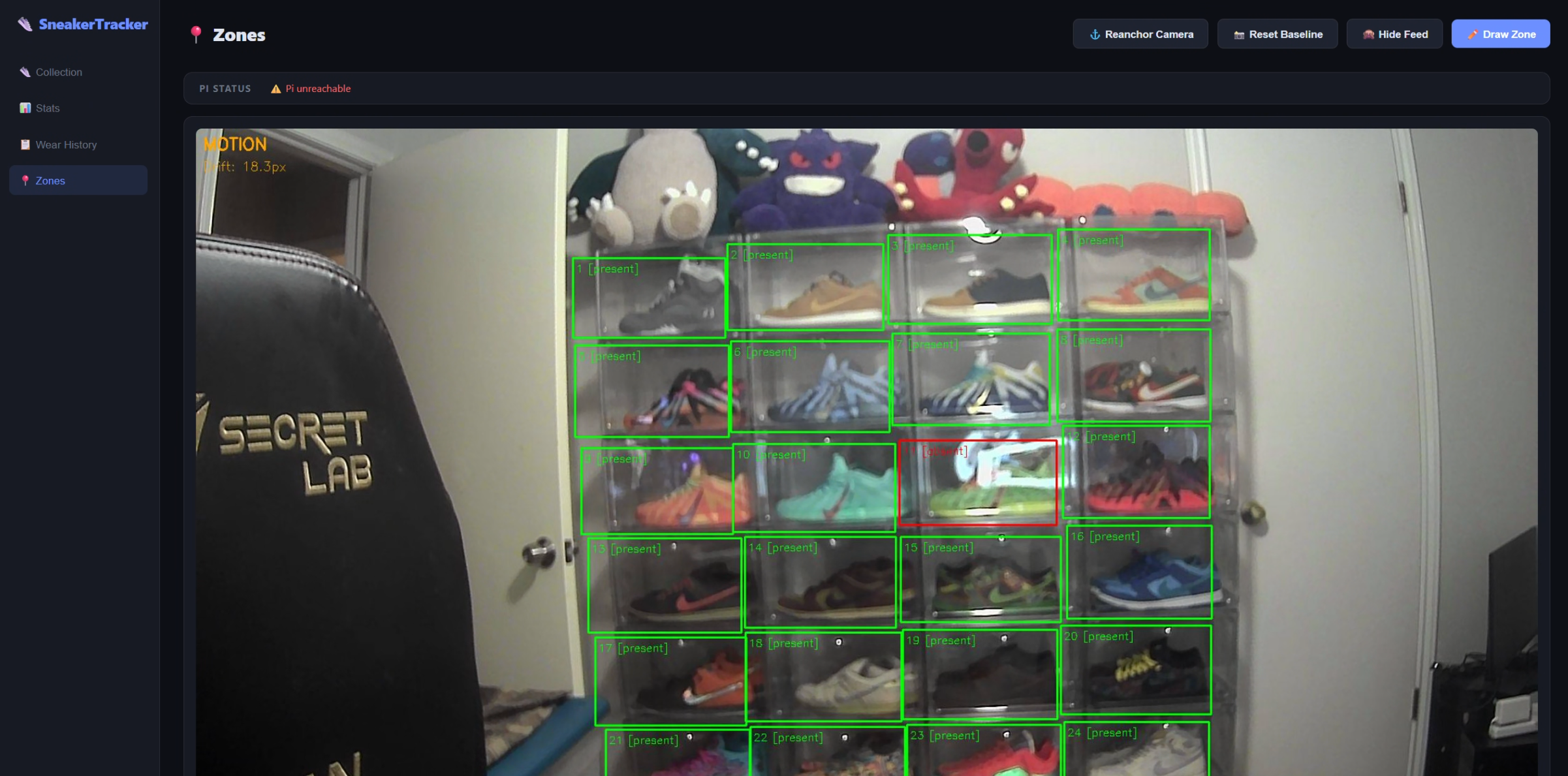
Rather than hardcoding zone coordinates, I built a zone editor into the React dashboard. You click "Draw Zone" and drag rectangles directly over the live camera feed. Each rectangle maps to a zone in the database — stored as (x, y, width, height) as percentages of the frame dimensions so they survive camera resolution changes.
The live feed is an MJPEG stream served by Flask on the Pi:
@app.route('/stream')
def stream():
    return Response(
        generate_frames(),
        mimetype='multipart/x-mixed-replace; boundary=frame'
    )
The dashboard fetches this as a regular <img> src and overlays the zone rectangles as absolutely-positioned divs. The Pi status bar shows real-time motion detection state and camera drift.
The Stack
FastAPI Backend
The backend is a FastAPI app with four routers: shoes, zones, wears, detections. PostgreSQL via asyncpg and SQLAlchemy async. The Pi posts to /detections/ on every state change — the backend handles the business logic of opening and closing wear sessions:
@router.post("/")
async def create_detection(data: DetectionCreate, db: AsyncSession = Depends(get_db)):
    if data.state == 'absent':
        # Open a new wear session
        wear = Wear(shoe_id=zone.current_shoe_id, zone_id=data.zone_id, worn_at=datetime.utcnow())
        db.add(wear)
    elif data.state == 'present':
        # Close the open wear session
        open_wear = await get_open_wear(zone_id=data.zone_id, db=db)
        if open_wear:
            open_wear.returned_at = datetime.utcnow()
Duration is computed as a generated column in Postgres — no application-level calculation needed.
Database Schema
shoes       -- id, name, brand, colorway, size, purchase_price, photo_url, active
zones       -- id, name, x, y, width, height, current_shoe_id
wears       -- id, shoe_id, zone_id, worn_at, returned_at, duration_minutes
detections  -- id, zone_id, state, confidence, detected_at
Photo Storage
Shoe photos are stored in Azure Blob Storage (sneakertrackerstorage / shoe-photos container). The upload endpoint receives the file, pushes it to blob, stores the full public URL in the DB. The dashboard renders images directly from the CDN URL — no API proxy needed.
blob.upload_blob(
    content,
    overwrite=True,
    content_settings=ContentSettings(content_type=content_type)
)
shoe.photo_url = f"https://sneakertrackerstorage.blob.core.windows.net/shoe-photos/{blob_name}"
React Dashboard
Four pages:
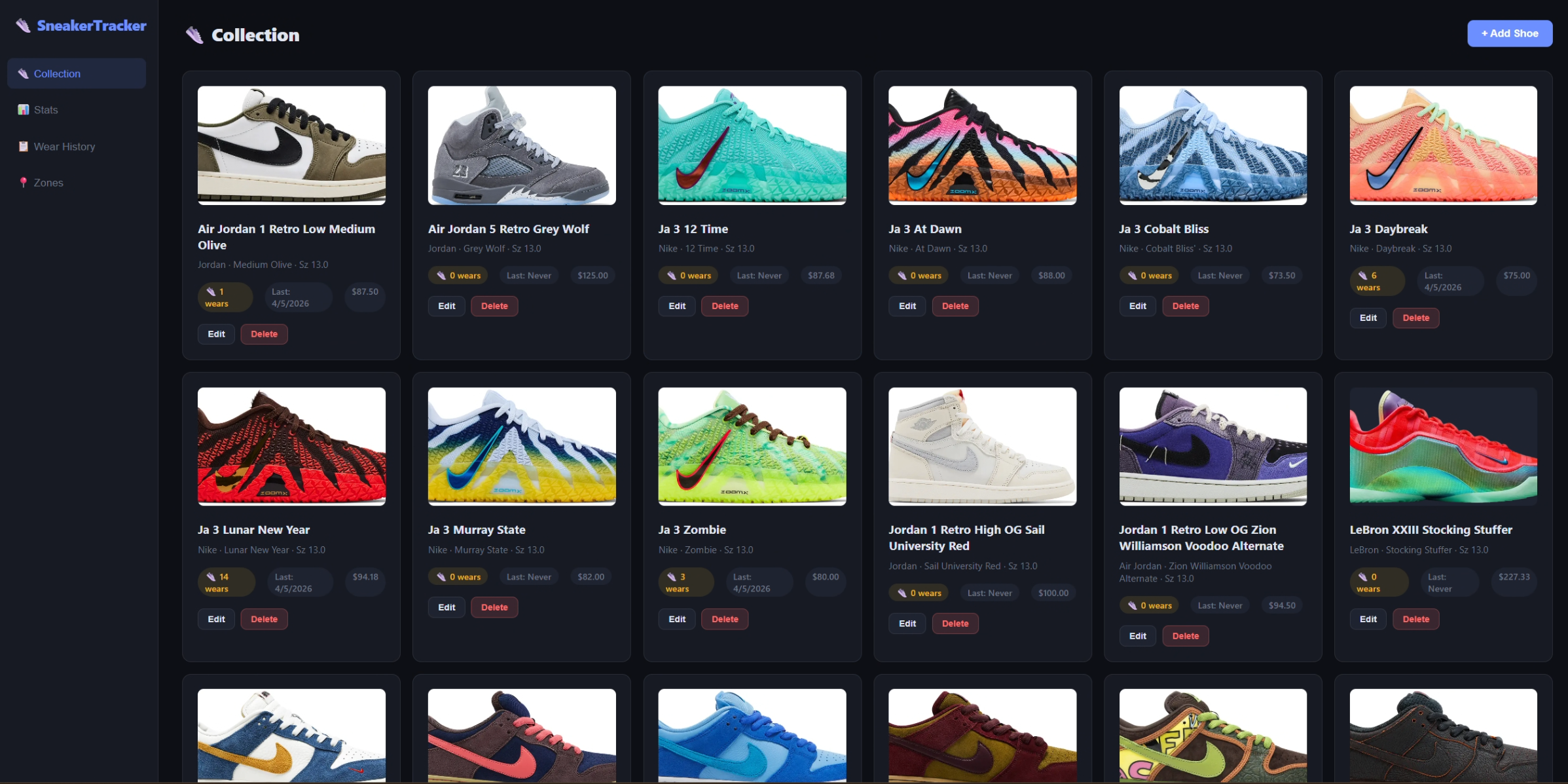
Collection — the main grid of shoes with photos, wear count, last worn date, and price. Click a shoe's photo area to upload a new image directly.
Zones — live camera feed with detection zone overlay. Draw new zones, reset baselines, reanchor the camera stabilizer.
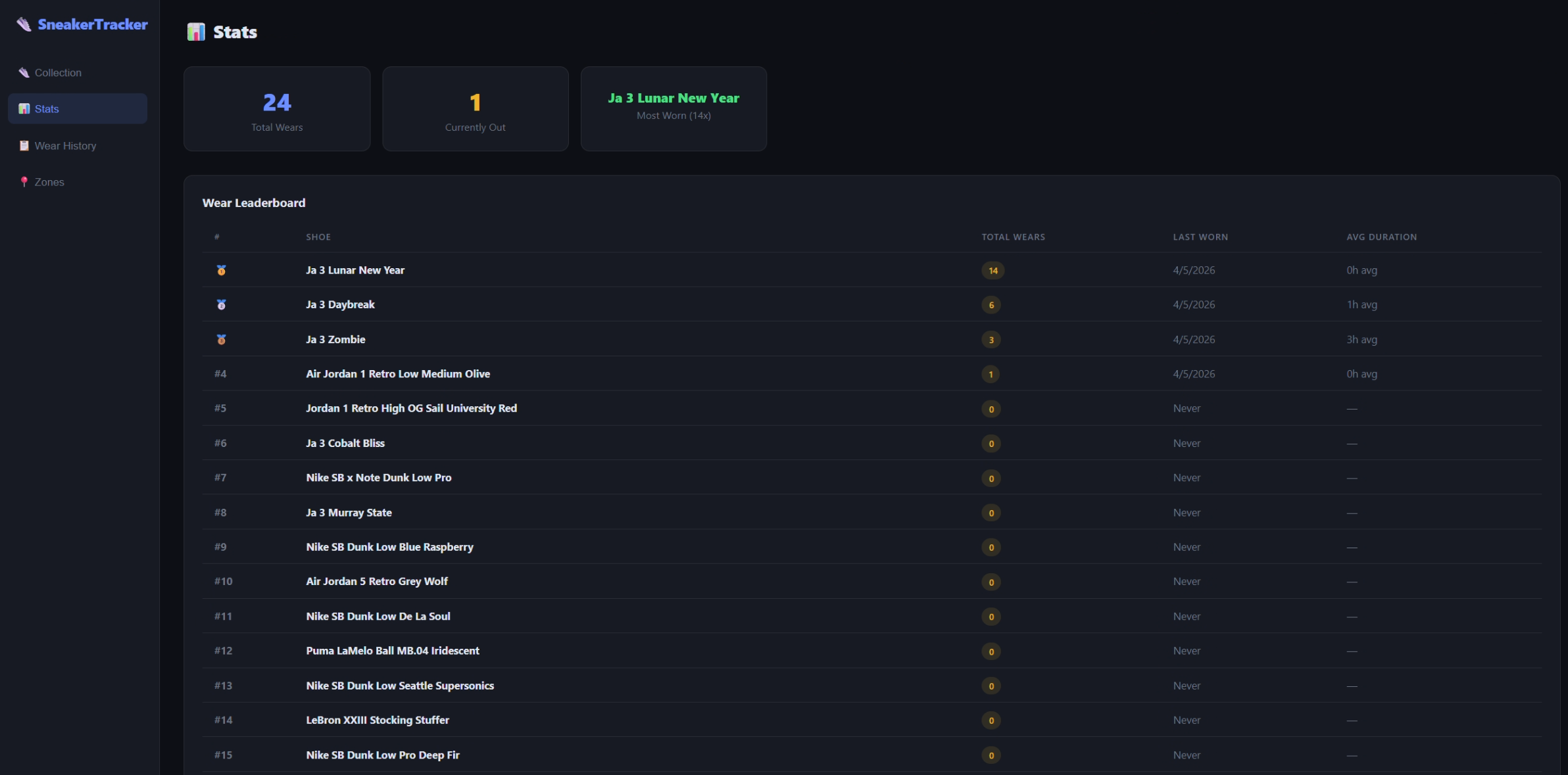
Stats — aggregate wear data. Total wears, currently-out count, most-worn shoe, and a full wear leaderboard with average session duration.
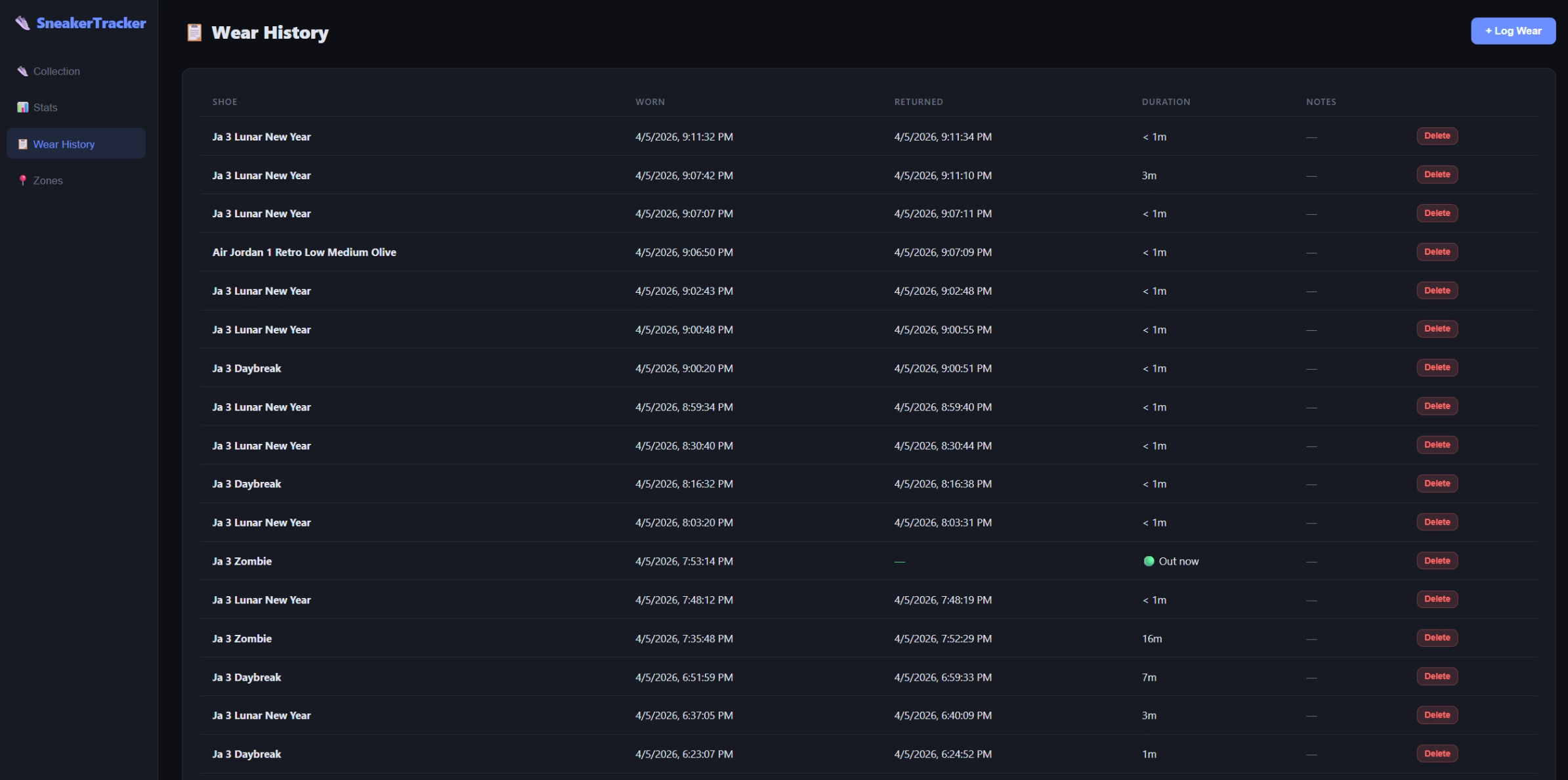
Wear History — chronological log of every wear session with timestamps, duration, and open sessions marked "Out now."
What Surprised Me
The lighting problem was worse than I expected. Monitor glow, passing clouds, turning a lamp on — all of these affect zone confidence. The mass-absent filter and brightness check handle the worst cases, but zones 11 and 12 near the monitor still get occasional false positives. Long-term fix is backlighting the shelf.
The optical flow stabilization was worth every line. Before it, a single footstep near the desk would shift the frame enough to spike 3–4 zones. After, the system barely notices.
USB webcam > ribbon camera for this use case. The IMX519 would have given better low-light performance, but the USB webcam has wider field of view out of the box and zero driver headaches on Pi OS Bookworm.
Postgres generated columns are underused. Duration is EXTRACT(EPOCH FROM (returned_at - worn_at)) / 60. Computed automatically, always correct, zero application logic.
Current State
- 28 zones covering the full shoe wall
- 28 shoes catalogued with photos, prices, and colorways
- Full detection pipeline running: Pi → API → DB → dashboard
- Wear leaderboard working (Ja 3 Lunar New Year leading with 14 wears)
- Azure Blob Storage for all shoe photos
- Pi vision service runs as a persistent process with auto-restart
Still to do:
- Fix photo upload for shoes already in DB with old local paths
- Backlight the shelf to reduce monitor-glare false positives
- Make the dashboard accessible from mobile (currently localhost only)
- Add push notifications when a shoe goes "out"
Stack Summary
| Layer | Tool |
|---|---|
| Vision | Python 3, OpenCV |
| Pi web server | Flask (MJPEG stream) |
| API | FastAPI + asyncpg |
| Database | PostgreSQL 16 (Docker) |
| Frontend | React 18 + Vite |
| Photo storage | Azure Blob Storage |
| Hardware | Raspberry Pi 5, USB wide-angle webcam |
The whole thing cost about $80 in hardware (Pi 5 + camera) and runs on infrastructure I already had. Azure Blob Storage at Cool tier for a few hundred shoe photos costs pennies a month.
If you have a sneaker collection and a Pi collecting dust, this is a genuinely fun project — especially if you want an excuse to mess with computer vision without dealing with neural networks.